Mise - Open-source recipe manager
Build your digital family cookbook. Store, share, and scale your favorite meals with a clean interface that stays out of your way.
🍽 Mise
mise en place — everything in its place
Open-source recipe manager you can self-host and fully own. Store and share recipes with photos, ingredients, and step-by-step instructions. Scale servings, search by text, filter by tag and category, import from any recipe URL.


Screenshots
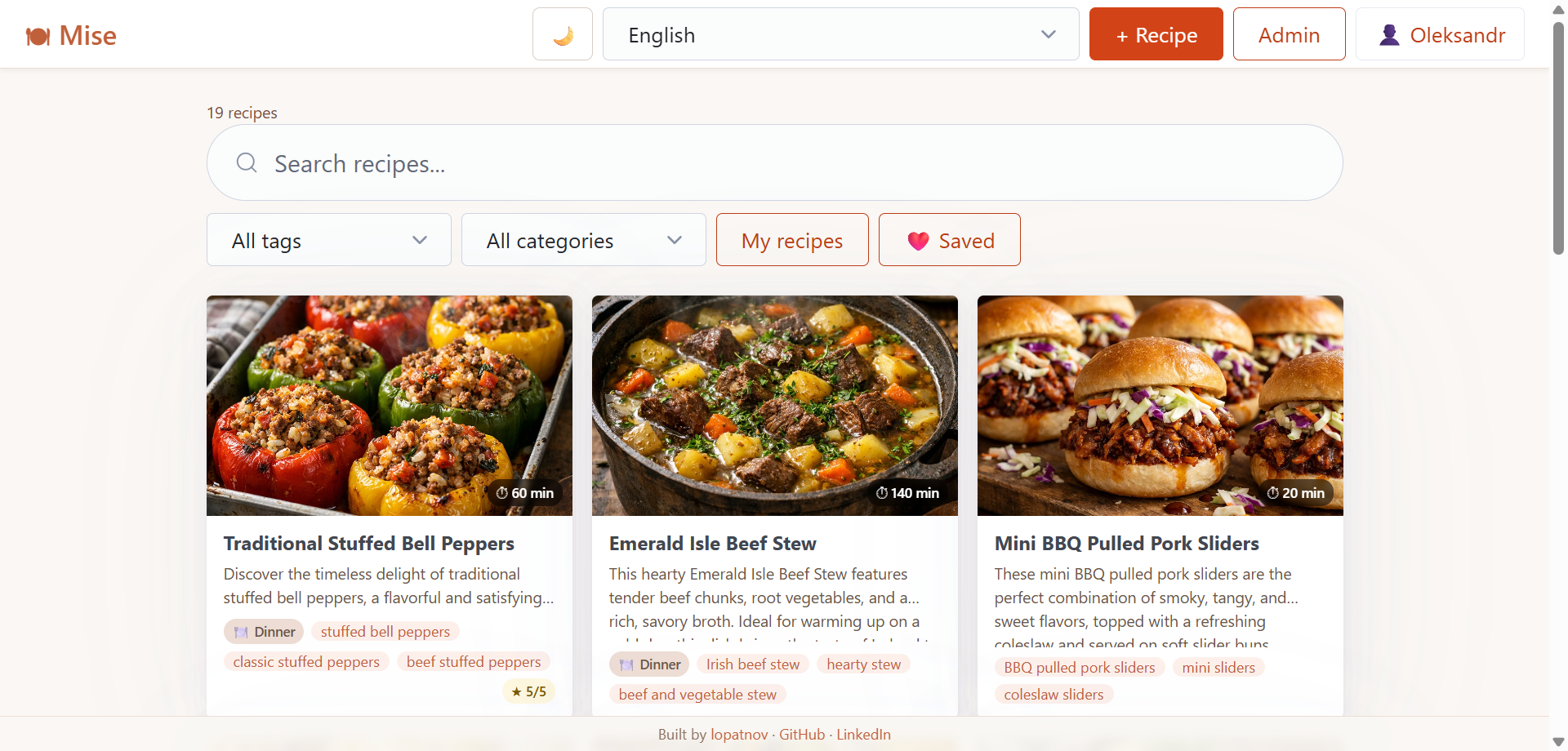
Recipe feed — browse, search by text, filter by tag and category, paginate
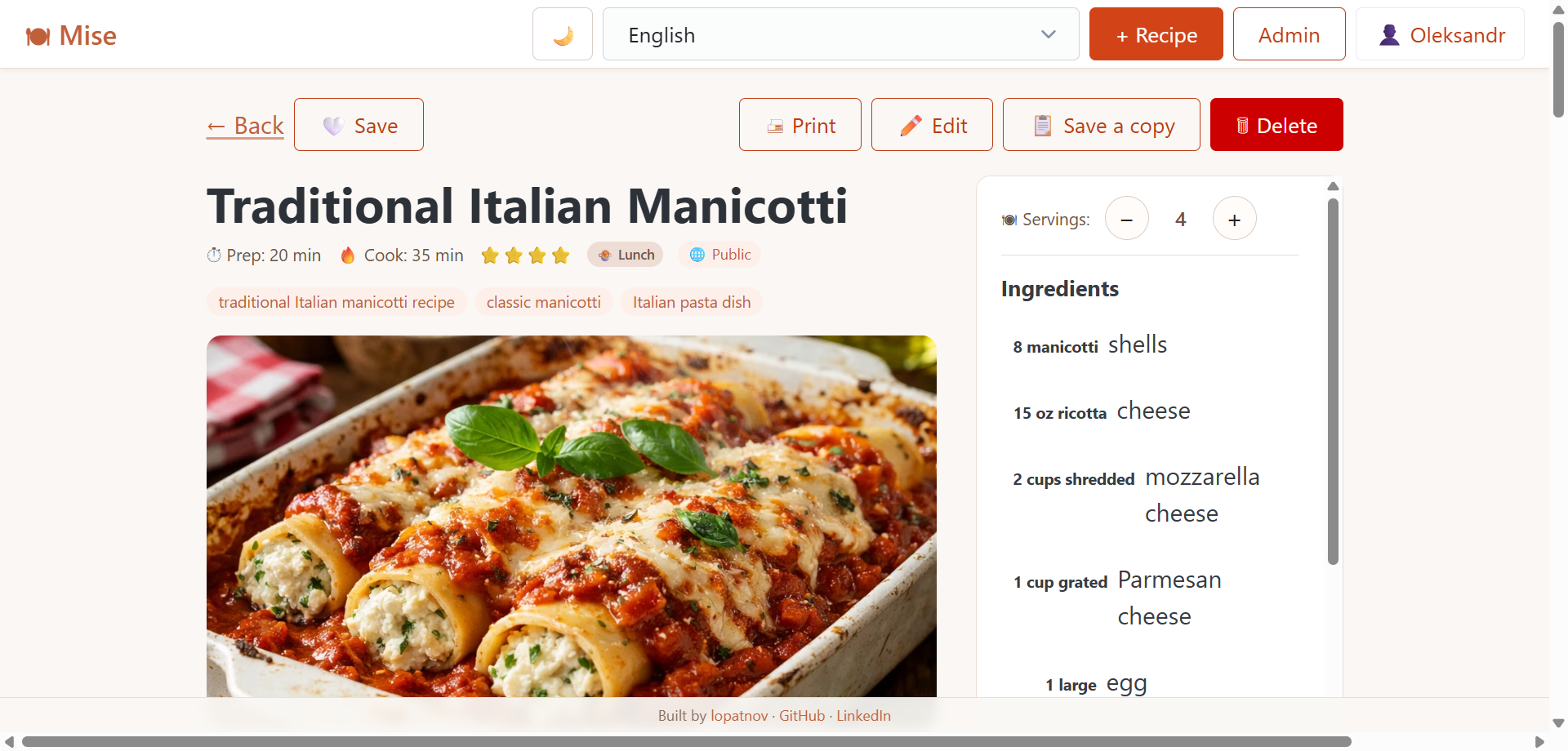
Recipe detail — ingredients sidebar, servings scaler, step-by-step instructions with photos
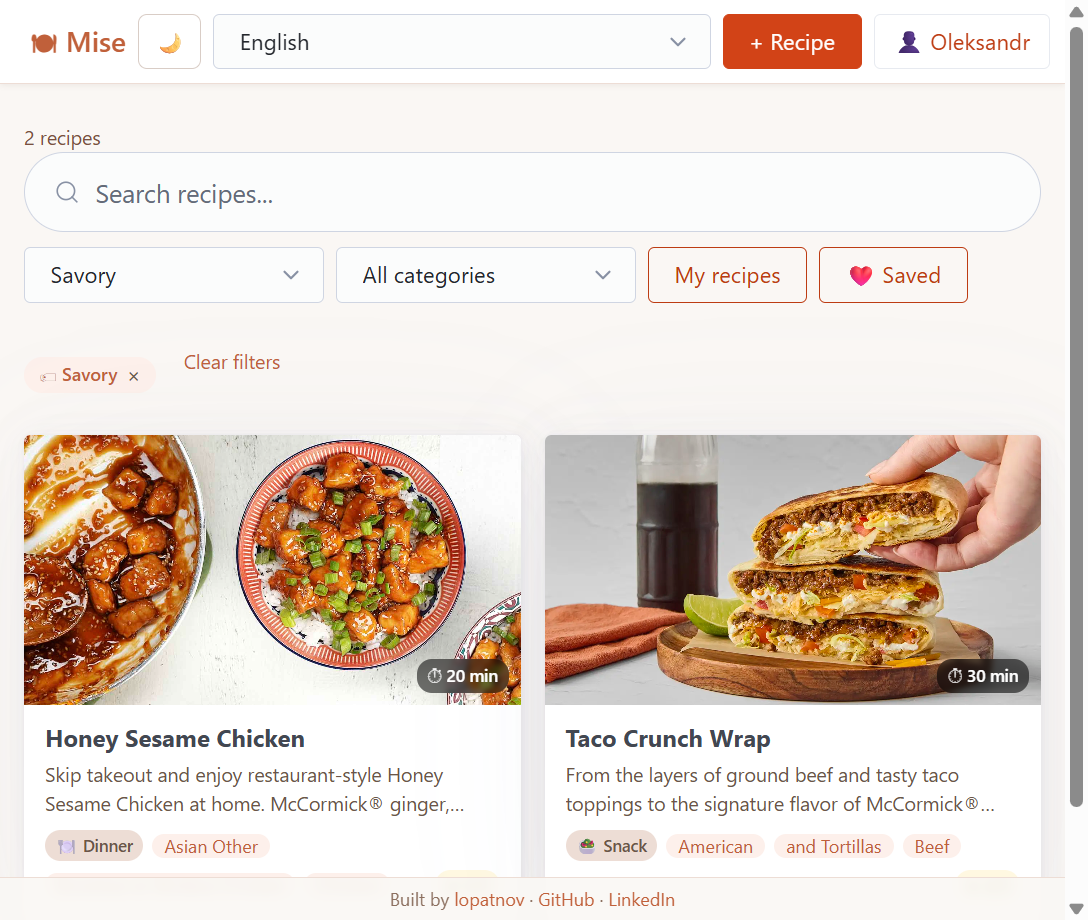
Tag filtering — active filter chip with one-click clear
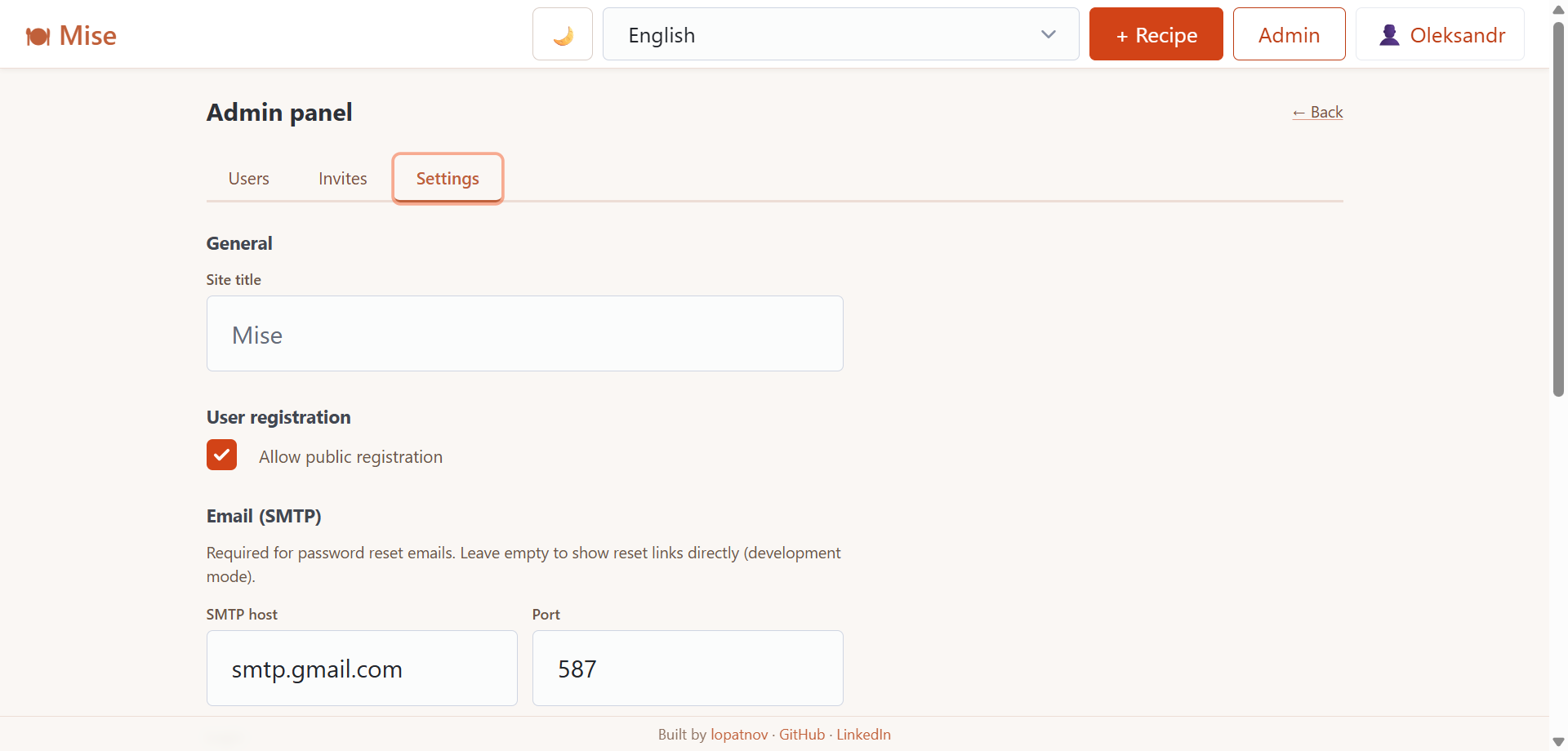
Admin panel — manage users, roles, invite links, SMTP and app settings
Stack
| Layer | Technology |
|---|---|
| Backend | Node.js 24, NestJS 11, TypeScript |
| Database | MongoDB 8, Mongoose |
| Auth | JWT Bearer, bcrypt |
| Frontend | React 19, Vite 8, React Query 5, Zustand 5 |
| i18n | react-i18next · 33 languages |
| Reverse proxy | nginx (single-port, CSP headers) |
| Infrastructure | Docker Compose |
Features
- Recipe management — create, edit, delete with full details
- Ingredients & steps — dynamic lists with per-step photos
- Photo upload — main photo + photo per step, lightbox viewer
- Categories — pre-seeded (breakfast, lunch, dinner, dessert…)
- Tags — tag filter with autocomplete from existing tags
- Search — partial text search across title, description, and tags
- Servings scaler — ingredient amounts scale automatically
- Sharing — mark recipes as public, visible to anyone
- Favorites — save recipes from the community feed to a personal bookmarks list
- Import from URL — paste any recipe page URL, structured data (JSON-LD / Open Graph) is extracted automatically
- Duplicate — save a copy of any recipe as a starting point
- Drag-and-drop reorder — reorder ingredients and steps by dragging
- Dark / light theme — toggle in the navbar, respects system preference
- Print view — clean print layout via CSS
@media print - Admin panel — user management, invite links, SMTP, password reset
- Email verification — new users verify their email before signing in; direct link shown when SMTP is not configured
- 33 languages — EN, UK, RU, BG, CS, DA, DE, EL, ES, FI, FR, HI, HR, HU, ID, IT, JA, KO, LT, LV, NL, NO, PL, PT, PT-BR, RO, SK, SV, TH, TR, VI, ZH, ZH-TW
Running locally (development)
Run in this order: MongoDB first → API → Frontend.
Prerequisites
| Tool | Version | Download |
|---|---|---|
| Git | any | https://git-scm.com |
| Node.js | 24+ | https://nodejs.org (LTS) |
| Docker Desktop | any | https://www.docker.com/products/docker-desktop |
Step 1 — Clone
git clone https://github.com/lopatnov/mise.git
cd mise
Step 2 — Start MongoDB
docker compose up -d
MongoDB runs on localhost:27017. Data is stored in the Docker-managed volume
mise_mongo_data and survives docker compose down — only docker compose down -v
wipes it. You will never need to restart MongoDB unless you explicitly stop it.
Step 3 — Start the API
cd api
npm install        # first time only
npm run start:dev  # watch mode — restarts on file changes
- API: http://localhost:3000/api
- Swagger: http://localhost:3000/api/docs
Step 4 — Start the frontend
cd web
npm install        # first time only
npm run dev        # Vite HMR — updates instantly on save
Open the app, go to /setup to create the first admin account, then register users.
Configuration files
| File | Committed | Purpose |
|---|---|---|
api/.env |
✅ | NestJS dev config — MongoDB localhost, placeholder secret |
web/.env |
✅ | Vite dev config — API URL for local development |
.env.prod |
✅ | Production secrets — edit APP_URL and JWT_SECRET before deploying |
api/.env and web/.env are used in development only.
.env.prod is used only when running with docker-compose.prod.yml.
Deploying
Requirements
- Linux server with Docker and Docker Compose
- One open port (default 80, configurable in
docker-compose.prod.yml)
Option A — Pre-built images (recommended, no build required)
Pull ready-made images from GitHub Container Registry — no Node.js, no source code needed.
Step 1 — Create a working directory and configure
mkdir mise && cd mise
Create .env.prod:
APP_URL=http://YOUR_SERVER_IP   # include port if not 80, e.g. http://YOUR_SERVER_IP:8080
JWT_SECRET=<long random string> # openssl rand -hex 32
JWT_EXPIRES_IN=7d
Step 2 — Create docker-compose.yml
services:
  mongodb:
    image: mongo:8
    container_name: mise-mongodb
    volumes:
      - mise_mongo_data:/data/db
    environment:
      MONGO_INITDB_DATABASE: mise
    restart: unless-stopped
    healthcheck:
      test: ["CMD", "mongosh", "--eval", "db.adminCommand('ping')"]
      interval: 10s
      timeout: 5s
      retries: 5

  api:
    image: ghcr.io/lopatnov/mise-api:latest
    container_name: mise-api
    depends_on:
      mongodb:
        condition: service_healthy
    env_file: .env.prod
    environment:
      MONGODB_URI: mongodb://mongodb:27017/mise
      PORT: 3000
    volumes:
      - ./data/uploads:/app/uploads
    restart: unless-stopped
    healthcheck:
      test: ["CMD", "wget", "-qO-", "http://localhost:3000/health"]
      interval: 15s
      timeout: 5s
      retries: 3
      start_period: 20s

  web:
    image: ghcr.io/lopatnov/mise-web:latest
    container_name: mise-web
    ports:
      - "80:80"   # change the first 80 to another port if needed
    depends_on:
      api:
        condition: service_healthy
    restart: unless-stopped

volumes:
  mise_mongo_data:
Step 3 — Start
docker compose up -d
Go to /setup to create the admin account on first run.
SMTP — configure
smtpHost,smtpPort,smtpUser,smtpPass,smtpFromin the admin panel to send email verification and password-reset links. Without SMTP, links appear directly in the API response — useful for self-hosted installs without a mail server.
Updating to a new release
docker compose pull
docker compose up -d
Option B — Build from source
Step 1 — Clone
git clone https://github.com/lopatnov/mise.git
cd mise
Step 2 — Configure
Open .env.prod and set:
APP_URL— your server’s URL (used in email links)JWT_SECRET— long random string (openssl rand -hex 32)
If port 80 is taken, change 80:80 in docker-compose.prod.yml to your port (e.g. 8080:80).
Step 3 — Start
docker compose -f docker-compose.prod.yml up -d --build
Go to /setup to create the admin account on first run.
Updating to a new release
git pull
docker compose -f docker-compose.prod.yml up -d --build
Stopping
# Stop containers (data is preserved)
docker compose -f docker-compose.prod.yml down

# Stop and wipe ALL data including database
docker compose -f docker-compose.prod.yml down -v
Data and backups
| Data | Location | Notes |
|---|---|---|
| MongoDB | Docker volume mise_mongo_data |
Managed by Docker, survives down |
| Uploaded photos | ./data/uploads/ on the host |
Plain files, easy to copy |
Back up MongoDB:
docker run --rm \
  -v mise_mongo_data:/data/db \
  -v $(pwd)/backup:/backup \
  mongo:8 mongodump --out /backup
Restore MongoDB:
docker run --rm \
  -v mise_mongo_data:/data/db \
  -v $(pwd)/backup:/backup \
  mongo:8 mongorestore /backup
Back up uploads:
cp -r ./data/uploads /your/backup/location/
Analytics & Tracking
Add any analytics script to web/index.html inside the <head> tag, before </head>.
<!-- Google Analytics example -->
<script async src="https://www.googletagmanager.com/gtag/js?id=G-XXXXXXXXXX"></script>
<script>
  window.dataLayer = window.dataLayer || [];
  function gtag(){dataLayer.push(arguments);}
  gtag('js', new Date());
  gtag('config', 'G-XXXXXXXXXX');
</script>

<!-- Privacy-friendly alternatives: Plausible, Umami, Matomo (self-hosted) -->
The script is embedded in the static HTML and fires on every SPA page. Rebuild the Docker image after editing (docker compose -f docker-compose.prod.yml up -d --build).
API
Swagger UI: http://localhost:3000/api/docs (dev) · http://YOUR_SERVER_IP/api/docs (prod)
All endpoints are prefixed with /api:
POST /api/auth/register          Register (checks allowRegistration + inviteToken)
GET  /api/auth/verify-email      Verify email address via token from registration email
POST /api/auth/login             Login → JWT (requires email verification)
GET  /api/auth/me                Current user
POST /api/auth/forgot-password   Request password reset link
POST /api/auth/reset-password    Set new password via token

GET    /api/admin/setup          Check if admin exists (public)
POST   /api/admin/setup          Create first admin (public)
GET    /api/admin/settings       App settings
PATCH  /api/admin/settings       Update settings (admin only)
GET    /api/admin/users          List users (admin only)
PATCH  /api/admin/users/:id      Update role/status (admin only)
DELETE /api/admin/users/:id      Delete user (admin only)
POST   /api/admin/invites        Create invite link (admin only)
GET    /api/admin/invites        List active invites (admin only)
DELETE /api/admin/invites/:id    Revoke invite (admin only)

GET    /api/recipes              List recipes (q, tag, category, mine, page, limit)
POST   /api/recipes              Create recipe
GET    /api/recipes/:id          Get recipe (public if isPublic=true)
PATCH  /api/recipes/:id          Update recipe
DELETE /api/recipes/:id          Delete recipe
POST   /api/recipes/:id/photo    Upload main photo
POST   /api/recipes/:id/steps/:order/photo  Upload step photo
POST   /api/recipes/import-url   Import recipe data from URL (JSON-LD / Open Graph)
GET    /api/recipes/public       Public recipes (no auth)
GET    /api/recipes/tags         All distinct tags (no auth)
POST   /api/recipes/:id/saved    Save recipe to favorites
DELETE /api/recipes/:id/saved    Remove recipe from favorites

GET  /api/categories             List categories
Troubleshooting
| Symptom | Cause | Fix |
|---|---|---|
Cannot connect to Docker daemon |
Docker Desktop not running | Open Docker Desktop and wait for the whale icon |
| API exits immediately | Missing api/.env |
Create the file as shown in Step 2 |
MongoNetworkError |
MongoDB not started | docker compose up -d from repo root |
| Frontend network errors | Wrong VITE_API_URL |
Check web/.env |
| 500 on login | User created before isActive field existed |
docker exec -it mise-mongodb mongosh mise --eval 'db.users.updateMany({isActive:{$exists:false}},{$set:{isActive:true}})' |
| Images not loading in Docker | Old named volume for uploads | The volume should be a bind mount — see docker-compose.prod.yml |
npm error ECONNRESET during --build |
Transient network drop from npm registry | Re-run docker compose -f docker-compose.prod.yml up -d --build — the error is intermittent and usually clears on retry |
Contributing
Contributions are welcome! Please read CONTRIBUTING.md before opening a pull request.
- Bug reports → open an issue
- Security vulnerabilities → GitHub Security Advisories (do not use public issues)
- Questions → Discussions
- Found it useful? A star on GitHub helps others discover the project
License
GNU General Public License v3.0 © 2025–2026 Oleksandr Lopatnov · LinkedIn